From tmux to Discord: Building a Multi-Project Gateway for Claude Code
How managing 5-6 concurrent AI coding sessions through SSH and tmux led to building an open-source gateway that routes Discord channels to per-project Claude Code sessions.
2026-03-22
I work on five or six projects at any given time. Each one has its own Claude Code session running in its own workspace. For weeks, this meant SSH-ing into a Linux box, juggling tmux panes, and hoping nothing broke.
It worked. Until it didn't.
The Setup That Almost Worked
The initial workflow was straightforward. A dedicated Linux machine running Claude Code sessions in separate tmux windows, one per project. SSH in from wherever, switch panes, interact with each session. This is a familiar setup — not unlike how many engineers manage multiple development environments.
The problems accumulated gradually:
- Tailscale re-authentication. Every time the VPN session expired, I had to re-authenticate before reaching the machine. Minor friction that compounds.
- Machine reboots. A kernel update or a power hiccup, and every session disappears. No persistence, no recovery. Start over.
- tmux session management. Five or six sessions mean five or six windows to track, switch between, and remember context for. The cognitive overhead of "which pane am I in" adds up.
- CLI usability from mobile. Sometimes I just wanted to check on a session or send a quick message from my phone. SSH into a terminal from a phone is technically possible. Practically, it's miserable.
None of these individually were dealbreakers. Together, they created enough friction that I started looking for alternatives.
The Discord Plugin — Close, But Not Enough
Claude launched an official Discord plugin that lets you interact with Claude Code sessions through Discord messages. This was promising. Discord runs everywhere, the interface is clean, and it eliminates the SSH dependency entirely.
I set it up. It worked well for a single project.
Then I tried to connect a second project and hit the wall: one bot token pairs with one Claude Code session. That's it.
To manage five projects, I would need five separate Discord bots — five separate applications registered in the Discord developer portal, five tokens, five configurations. The official documentation suggests this as the workaround: run multiple bots on one machine with different tokens and separate state directories.
This defeats the purpose. I wanted to simplify my workflow, not multiply my bot management.
The Conversation That Built the Product
I described this exact limitation to Claude Code — not as a feature request, but as a problem I was thinking through. I explained the constraints: multiple projects, single Discord bot, per-channel routing.
What happened next was unexpected. Claude didn't just discuss the problem. It started building.
It produced a design spec first — defining the architecture, the component boundaries, the routing model. Then an implementation plan with nine concrete tasks, each with test-first methodology. Then it started executing, task by task.
Three to four hours later, the gateway was running.
How the Gateway Works
The architecture is deliberately simple. One Discord bot, multiple channels, each channel mapped to a project directory:
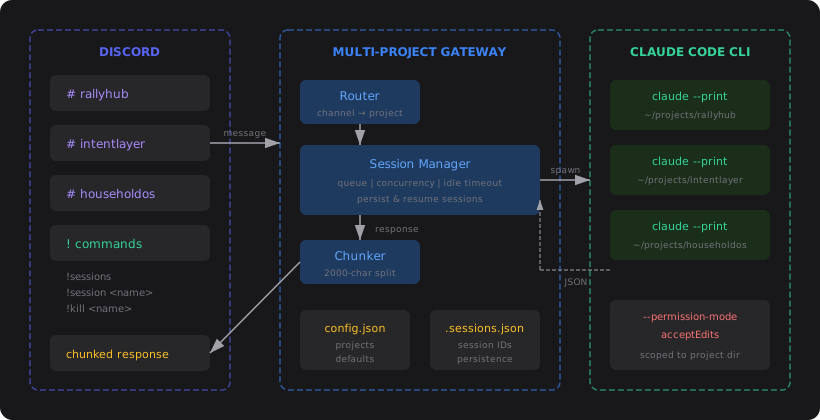
A message posted in a Discord channel flows through a router that maps the channel ID to a project configuration. The session manager spawns a claude --print process in that project's directory — or resumes an existing session using Claude's --resume flag. The JSON response is chunked to fit Discord's 2000-character limit and sent back to the channel.
The configuration maps channel IDs to project directories:
{
  "defaults": {
    "idleTimeoutMs": 1800000,
    "maxConcurrentSessions": 4
  },
  "projects": {
    "CHANNEL_ID_1": {
      "name": "rallyhub",
      "directory": "/home/user/projects/rallyhub"
    },
    "CHANNEL_ID_2": {
      "name": "intentlayer",
      "directory": "/home/user/projects/intentlayer"
    }
  }
}
Post a message in the #rallyhub channel, and it reaches the Claude Code session running in the RallyHub workspace. Post in #intentlayer, and a different session in a different directory handles it.
The session manager handles concurrency — one message at a time per project, with queuing for concurrent requests. There's an idle timeout that cleans up sessions after 30 minutes of inactivity, and a global concurrency limit to prevent resource exhaustion. Sessions persist to disk and survive gateway restarts.
Security model
Each Claude session runs with --permission-mode acceptEdits by default. This means Claude can read and edit files within the project directory but cannot access files outside it or run arbitrary shell commands. Since the gateway runs in --print mode, any action requiring approval is auto-denied.
This is important because anyone who can post in a mapped Discord channel can instruct Claude to modify files in that project's directory. Restrict channel access in your Discord server settings to trusted users only.
Session introspection
The gateway exposes Discord commands for managing sessions without leaving the chat:
| Command | Description |
|---|---|
!sessions | List all active sessions with idle time and queue depth |
!session <name> | Inspect a specific project's session — get the session ID, idle time, and queue status |
!kill <name> | Force-close a project's session |
The !session command is particularly useful for bridging between Discord and the terminal. It returns the session ID, which you can use to resume the same conversation in the CLI:
cd /path/to/project
claude --resume <session-id>
This lets you start a conversation from your phone via Discord, then pick it up in the terminal when you're at your desk — or vice versa.
What Changed
The difference is hard to overstate.
I now have dedicated Discord channels for every active project. From my phone, my laptop, anywhere Discord runs, I can check on any project, ask questions, request changes, or review what happened while I was away. No SSH. No tmux. No re-authentication.
Switching between projects is switching between channels. The mental model maps cleanly — each channel is a workspace, each workspace has context, and the conversation history is right there in Discord.
The only thing I genuinely miss is Claude's working visuals from the CLI. In the terminal, you can see Claude thinking, reading files, running commands in real-time. Through Discord, you get the final response but not the process. It's a tradeoff I'm comfortable with for the accessibility gain, but it's worth noting.
I still occasionally SSH into the Linux machine for non-Claude tasks — running manual commands, checking system state, troubleshooting. But it's rare. The vast majority of my development interaction now flows through Discord.
Does Anything Else Solve This?
I looked. The landscape as of March 2026:
Single-session bridges are well-represented. Projects like cc-connect (2,500+ stars), Claude-to-IM, and Claude-Code-Remote let you interact with a single Claude Code session through Discord, Slack, Telegram, or email. They're mature and widely used. But they solve a different problem — connecting one session, not routing between many.
Multi-session tools are nascent. A handful of projects — cc-conductor, catclaw, claudecode-discord — attempt something similar to what I built. All were created in the same week (March 2026), all have near-zero adoption. The problem is clearly being felt by others. No solution has traction yet.
Terminal-based multi-session managers exist. Tools like agent-deck (1,600+ stars) let you manage multiple AI coding sessions from a TUI. Good for the local terminal workflow, but they don't solve the remote access problem.
The official plugin has no multi-session roadmap that I've found. The architecture assumes one-to-one pairing.
The gap is real: there is no mature, single-bot solution for routing Discord messages to multiple Claude Code sessions. The pieces exist — discord.js, Claude's CLI flags, session management patterns — but nobody has assembled them into something adoptable.
What This Experience Demonstrates
This project is interesting to me not just as a tool, but as a data point about how AI-assisted development works in practice.
The gateway went from "I have this problem" to "working solution" in a single afternoon. I didn't write a line of code. I described the problem, validated the design, reviewed the output, and tested the result. Claude produced the design spec, the implementation plan, the tests, and the code.
This is the pattern I keep seeing: the bottleneck is knowing what to build, not building it. Once the problem was clearly articulated and the constraints were defined, execution was fast. The design decisions — spawn-per-message vs. long-lived processes, channel-based routing vs. slash commands, JSON output parsing vs. raw text — those were the hard parts. The typing was not.
It's also a product that was built to solve a problem I had while using the tool that built it. There's something recursive about using Claude Code to build infrastructure for better access to Claude Code. But that's increasingly how development works when your primary collaborator is an AI agent — you end up building tooling around the collaboration itself.
Try It
The gateway is open source and available on GitHub: github.com/yama-kei/multi-project-gateway. MIT licensed.
Quick start
Install globally via npm:
npm install -g multi-project-gateway
Run the setup wizard:
mpg init
The wizard walks you through everything — it checks that the claude CLI is available, asks for your Discord bot token, and lets you add projects one by one. It generates config.json and .env for you.
Then start the gateway:
mpg start
Prerequisites
- Node.js 20+
- Claude Code CLI installed and authenticated (
claudeavailable on PATH) - A Discord bot token — create one in the Discord Developer Portal, enable the Message Content Intent, and invite the bot to your server with Send Messages, Read Message History, and Add Reactions permissions
Manual setup
If you prefer to clone and configure manually:
git clone https://github.com/yama-kei/multi-project-gateway.git
cd multi-project-gateway
npm install
Create a .env file with your bot token:
DISCORD_BOT_TOKEN=your-bot-token-here
Create a config.json mapping Discord channel IDs to project directories:
{
  "defaults": {
    "idleTimeoutMs": 1800000,
    "maxConcurrentSessions": 4
  },
  "projects": {
    "DISCORD_CHANNEL_ID": {
      "name": "MyProject",
      "directory": "/absolute/path/to/project"
    }
  }
}
To get a channel ID, enable Developer Mode in Discord settings (App Settings > Advanced > Developer Mode), then right-click a channel and select Copy Channel ID.
Start with npm run dev for development or npm run build && npm start for production.
What's Next
The core problem — managing multiple AI agent sessions from a single interface — isn't going away. If anything, it gets worse as AI-assisted development becomes the default workflow. The number of concurrent projects a single developer can maintain is going up, not down.
Platform expansion is the most obvious next step. Discord works well for me, but Slack and Telegram are equally valid routing targets. The architecture already separates the messaging layer from the session management, so this is more wiring than redesign.
If you're managing multiple Claude Code sessions and want a single pane of glass, give it a try. If you want to extend it — Slack support, Telegram routing, richer session introspection — contributions are welcome.